New Horizons
 Project Management Academy
 Six Sigma Online
 TCM Security
 TRACOM
 Velopi
 Watermark Learning
 Login
Login



Key Takeaways
- Start Small: Research and drafting are practical, lower-risk places to begin
- Guardrails Matter: AI mistakes become business risks when teams skip the review step
- Shared Standards Win: Productivity gains compound when everyone applies the same guardrails
Consider two people on the same team using the same AI tool. One now spends an hour less a day on status updates and research pulls. The other trusts a meeting summary that misses a decision point, and the mistake makes it into a client email before anyone catches it.
Same tool, same access, completely different outcomes. This gap is the real story on teams right now. A few people have already found real shortcuts with AI, and the opportunity is to get everyone else there fast by putting shared practices in place instead of leaving each person to figure it out alone.
This month, that’s fixable. Below are ten AI wins your team can start using now, from research and drafting to meetings and cross-team updates, each paired with a guardrail so the win doesn’t turn into a liability.
Give Your Team a Head Start on Research and First Drafts
Research and first-draft work is the easiest place for a team to start with AI, because the task itself keeps a human in the loop. No one should hand off a first draft or research pull without verifying it first, so the review step should become a part of every task. This makes it the right initial on-ramp before moving to higher-stakes work.
1. Let AI scan the landscape first
Quick start: Ask AI to orient your team on an unfamiliar topic before deeper research begins.
Guardrail: Verify anything you plan to cite before anyone uses it externally.
2. Let AI draft it first
Quick start: Ask AI for a rough draft of your next status update or recurring report.
Guardrail: Have someone check tone and accuracy before it goes out.
3. Build one AI template and reuse it
Quick start: Turn a document type your team drafts often, like job descriptions or policy summaries, into a reusable AI prompt template.
Guardrail: Route anything with legal, HR, or compliance implications through the right reviewer first.
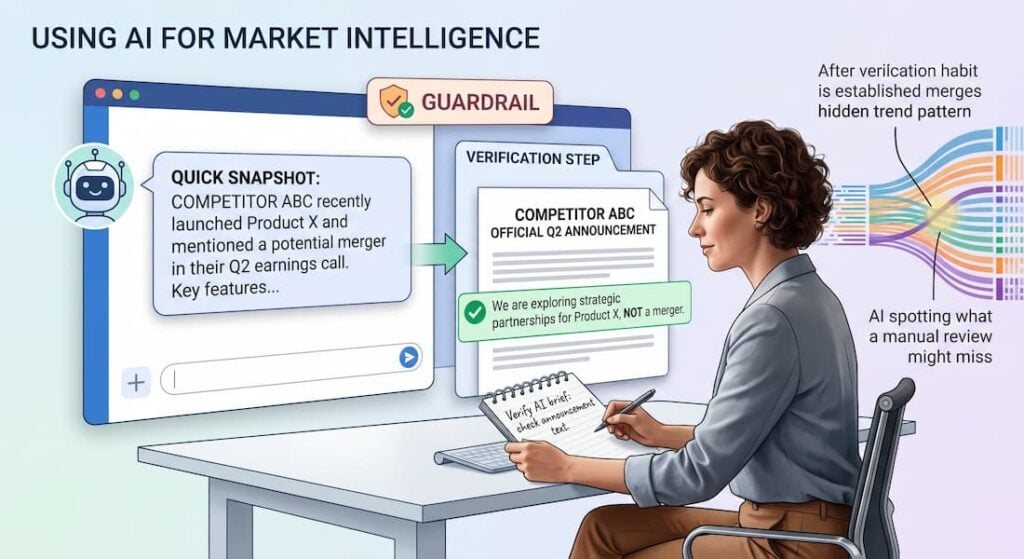
4. Get a fast read on the competition
Quick start: Ask AI for a quick snapshot of a competitor’s or market segment’s recent activity.
Guardrail: Verify recent claims against original company announcements or other approved sources before using the briefing.
Once your team has these habits down, AI can do more than save time. It can help spot what a manual review might miss.
Let AI Spot the Patterns So Your Team Can Focus on the Decisions
Once a team is comfortable letting AI handle research and drafting, the next step is analytical work: finding what matters in information a person would otherwise have to review manually. AI is good at showing what stands out, but it can’t decide what the data means. Every win here should pair patterns with someone who confirms it.
5. Have AI flag what’s unusual first
Quick start: Feed AI a spreadsheet or report you already go through by hand and ask it to find any pattern that stands out.
Guardrail: Have someone familiar with the data verify the pattern and rule out missing or misclassified records before anyone acts on it.
6. Let AI shrink your inbox
Quick start: Ask AI to summarize your longest thread or document before a related meeting.
Guardrail: Spot-check the summary against the source for anything decision-critical.
7. Sketch scenarios fast
Quick start: Ask AI to outline two or three options for a decision you’re weighing.
Guardrail: Use only approved AI tools, and enter sensitive financial or personnel data only when your organization’s data policy explicitly permits it.
Once a team trusts AI to flag what matters, that same instinct carries into the room. It’s time to put it to work in meetings and the updates that follow.
Turn AI Into Your Team’s Notetaker and Deck-Builder
Research, drafting, and analysis are mostly solo wins. The next stretch is where AI creates the content that gets shared with other people, in meetings and beyond them. The wins here save time for everyone involved, and that raises the stakes on the guardrails.
8. Let AI take the notes
Quick start: Test AI notetaking in one routine, non-sensitive internal meeting.
Guardrail: Use an approved notetaking tool, notify participants, and have the meeting owner confirm action items before the notes go out.
9. Let AI build your first slide draft
Quick start: Turn your notes or a project recap into a rough deck outline.
Guardrail: If the deck is headed to clients, check for anything that should stay internal before sending it.
10. Let AI compile the cross-team roundup
Quick start: Pull together a one-page status summary from multiple teams’ updates instead of chasing each one manually.
Guardrail: Have each team lead confirm status, ownership, and audience before distributing the roundup.
Scattered adoption only gets a team part of the way there. The real gain comes when everyone applies these guardrails.
Standardize How You Use AI
These wins work no matter which AI tool your team already has. The right setup depends on your organization’s approved tools, integrations, and data policies.
What doesn’t change is the habit: protect sensitive inputs, and check outputs before they reach a client or someone inside the company who shouldn’t see them.
None of the ten wins above require a big rollout or a new tool. They require teams to apply these habits consistently. Agentic AI, where connected, multi-step workflows link several of these tasks together, is the horizon worth building toward once these habits are second nature.
Scattered AI habits rarely turn into lasting capability on their own. Educate 360 builds training paths around how your teams use AI, not a generic, one-size-fits-all course.
Where is your team struggling to use AI consistently?
Talk to Educate 360 about a custom training path for your organization.